RTOS Fundamentals
Definition
Real-time: is doing something within a specified time constraint
- Hard real time : missing the dead-line consists a system failure
- Soft real time : like video streaming where some buffering is okay
(also called firm real time)
Types of real-time system
-
hardware :
- ASIC
- PLD
- FPGA
→ Down sides are expensive hard to develop, complex
-
Bare metal (firmware):
→ Code that has total control of all aspects of the hardware, this type of implementation excels when there is a small number of relatively simple tasks (or one monolithic task)
RTOS-Based firmware:
- Give the illusion that each task has the processor to itself.
RTOS-Based software:
- Software running on a full OS that has an MMU and a CPU.
- The advantage of ruing a full OS is all of the capabilities that come with it.
Jitter
What is Jitter?:
Is the delay between an event being triggered and being detected.
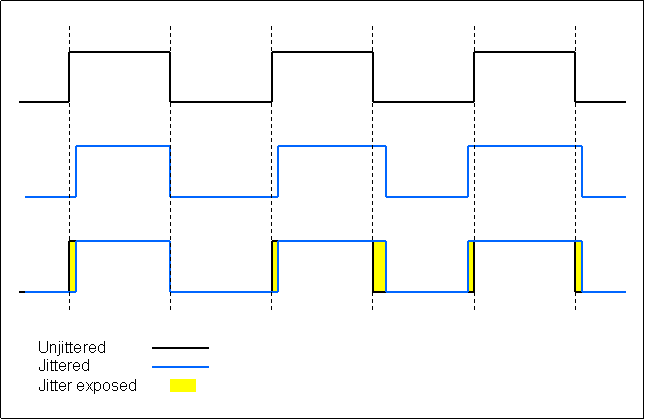
💡 Note that if a system has a maximum amount of jitter the system is considered determistic
Interrupts
- Interrupts are signals sent to the MCU or CPU indicating that an event has taken place and directly execute specific code (called an interrupt service routine ISR).
💡 In ARM cortex-M, when two interrupts occur one before the other finish executing, the CPU does not restore context to the pre-interrupt state, it continues in the same state and executes the next ISR.
- An ISR should be as small as possible (to avoid the risk increasing delay) so generally, an ISR sets a flag in a register or writes a value to an array in RAM.
DMA: Direct Memory Access
-
without DMA: the CPU must keep polling using ISR (i.e., in case of UART, check a register if there is a new byte to read) , then the CPU must copy that data into RAM
→ Too much work for the CPU to do... specially when dealing with realtime systems
-
So the use of DMA which handles the transferring of data between peripherals and RAM (and way faster than using the CPU when dealing with large amount of data)
- DMA takes time to setup and start transferring.
- DMA is great for accessing a large number of peripherals.
Preemptive / Cooperative
Preemptive: The OS can interrupt a running task to assign CPU time to another.
(ISR have highest priority and they can stop any task.)
Cooperative: voluntarily giving control to each other.
- A task: in the context of RTOS
- a task is another way of saying another loop
- each task has its own private stack (not shared like with a super loop)
- each task has a priority
- only when an ISR or scheduler needs to run, does a task is stopped
(note: when the scheduler is called, that does not mean control will be given back to the same previous task)
semaphores vs mutexes
Semaphores: they are a way to manage access to a shared resource between multiple tasks, using a system that is similar to having a pass, and only who has the pass can access the shared resource.
e.g.: let’s say we have 3 tasks with priorities A > B > C,
where A, B, C share a resource.
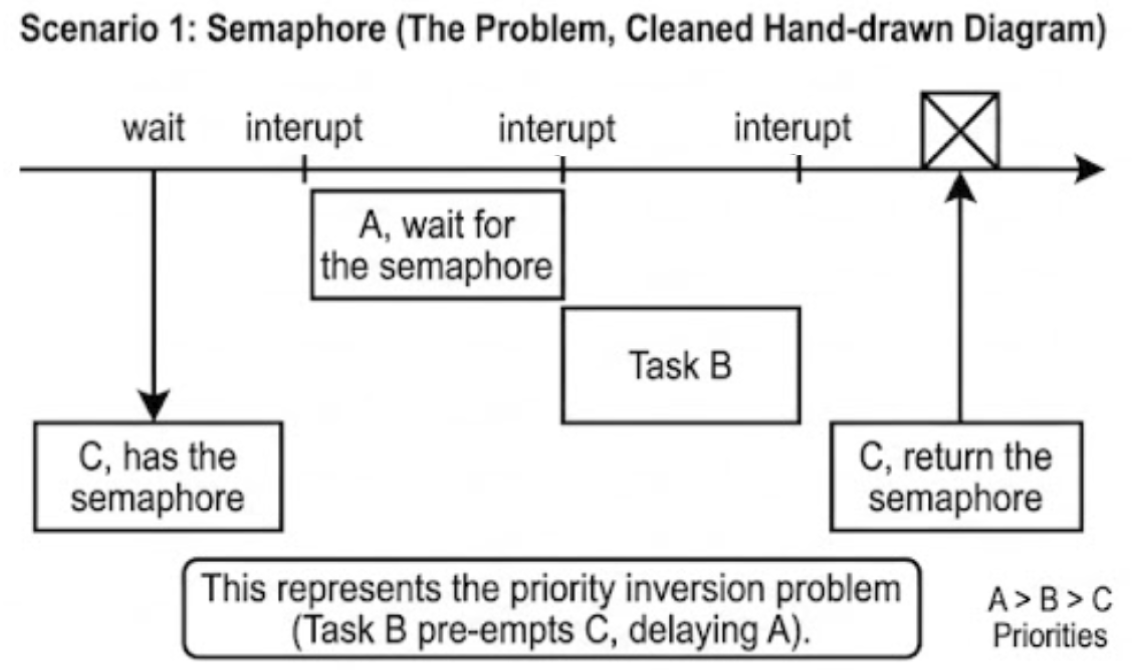
A, wait for the semaphore
C has the semaphore task B C returns the semaphore
Do you see the problem?
Because C has a lower priority than A & B, so B will execute before C, thus delaying task A.
—> Thus the need Mutexes
Mutex: Similar to a semaphore but with one simple difference, that is priority change
e.g. if the mutex is being held by a task C, that has a lower priority then task A, the Scheduler will change the priority of task C momentarily (until task C releases the mutex)
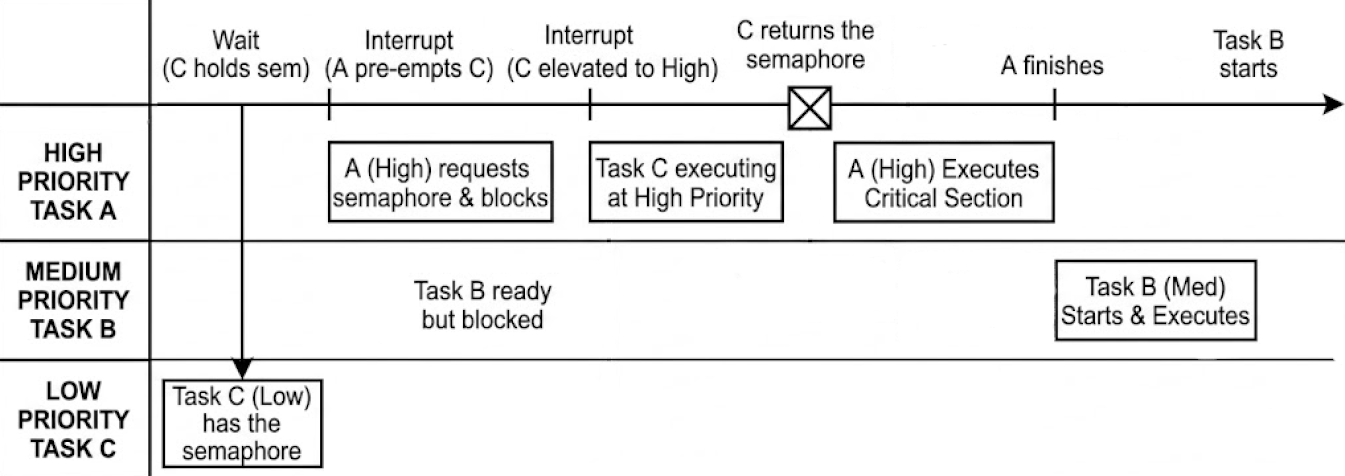
mutex = binary semaphore + priority change
ROM (Read Only Memory)
How to go about choosing the size of the ROM when you don't know how much to need??
- Select a family of MCUs that has multiple flash sizes and compatible footprints.
- Start developing on the MCU that has the biggest flash size so you are not limited and give yourself the flexibility to develop and add features.
- After knowing the ROM size you need, choose the right MCU.
Tip: When changing to another MCU, make sure to check peripheral assignments between models, pin compatible doesn’t always mean peripheral compatible.
RAM (Read Access Memory)
a large amount of RAM is needed when dealing with large buffers for data, complex networking stacks, deep buffers, GUI's, and any interpreted languages that run a VM (like micropython and lua)
note: that each Task in FreeRTOS requires its own stack + min of 512 bytes on Cortex-M
the use of external RAM:
- increase the amount of ram by nearly an order of magnitude
- ↑ the cost, ↑ the complexity of the pcb design,
- ↑ EMI (elector-magnetic interference) because of the high speed signals
- external RAM is slower which leads to a complex linker file
- But also ext RAM, enables functionalities like, cache entire, firmware image for updates, …
CPU Clock Rate
- Sometimes there are on-board hardware peripherals that can make a huge difference to execution speed that have nothing to do with CPU clock rate
- some CPU's maximum clock freq is incompatible with generating an internal 48MHz clock required for USB peripheral, it can't be maximum speed if the usb peripheral is also used
price: (BOM: bill of material)
- The BOM costs come under increasing scrutiny in high-volume applications.
- however with lower volume product it is often wise to focus on minimizing the development cost, rather than achieving a low BOM cost, by focusing lower the engineering work and effort the product can hit the market much faster, saving money and starting to generate revenue faster, d'ou faster R.O.I (return on investment)
Availability
- you must check if the MCU you gonna work on will still be available after years, when your product in production
Note about hardware regarding DMA:
DMA: Direct memory access, is extremely useful in situations like high bandwidth or highly event-driven code is used.
how freertos handler multiple tasks execution on cpu with multiple cores
FreeRTOS can use multiple cores, but how it does so depends on the port and SoC.
Two models you’ll see:
- AMP (asymmetric multiprocessing): One FreeRTOS instance per core, no shared scheduler. Tasks never migrate between cores. Cores communicate via shared memory/interrupts (queues, RPMsg, etc.). Common on Cortex‑M MCUs like STM32H7 (M7+M4).
- SMP (symmetric multiprocessing): One kernel schedules across multiple cores. Used by ESP32 and the upstream FreeRTOS SMP ports for certain architectures.
How FreeRTOS SMP schedules:
- Global scheduler picks up to N highest‑priority ready tasks to run on N cores (configNUM_CORES).
- One idle task per core. A task runs on exactly one core at a time.
- Preemption across cores: if a higher‑priority task becomes ready, the kernel sends a cross‑core interrupt to preempt a lower‑priority task on the appropriate core.
- Time slicing among equal‑priority tasks works across cores (configUSE_TIME_SLICING).
- Task affinity: a task can be limited to specific cores; otherwise it may run on any core.
- ISRs can unblock tasks; the scheduler chooses which core should run the unblocked task.
- Critical sections and kernel data structures are multicore‑safe (spinlocks); queues/semaphores/mutexes work across cores with priority inheritance.
- Tick can be driven by one core (or coordinated per‑core), and tickless idle is supported with SMP‑aware synchronization.
Notes for your setup:
- STM32F4 is single‑core; only uniprocessor FreeRTOS applies.
- Dual‑core Cortex‑M parts typically use AMP (two kernels) rather than the upstream SMP kernel.
Example: pin a task to cores 0 and 1 in an SMP port:
// ...create the task first...
TaskHandle_t h = NULL;
xTaskCreate(MyTask, "t", 1024, NULL, tskIDLE_PRIORITY + 1, &h);

// Allow task to run on cores 0 and 1 (bitmask)
UBaseType_t mask = (1U << 0) | (1U << 1);
vTaskCoreAffinitySet(h, mask);
Key takeaway: FreeRTOS doesn’t run a single task on multiple cores simultaneously; it runs different tasks concurrently on different cores, preemptively, honoring priorities and (optional) core affinity.