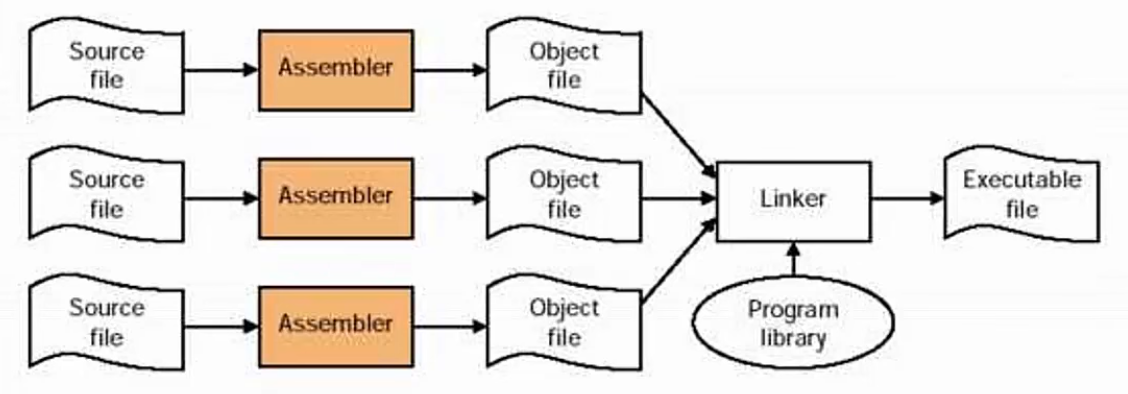
Preprocessing, compiling, assembling, and linking
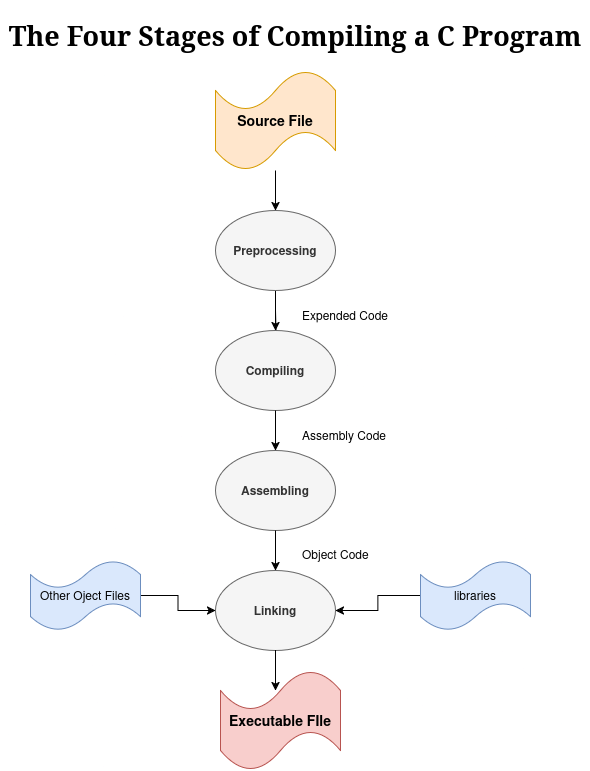
The compiling a multi-file c program is multi stage process:
an overview of the process:
Preprocessing, Compiling, Assembling and Linking
Preprocessing
The preprocessing step is the first phase of compiling a C program.It removes comments, expands macros, and includes headers. It controls compilation with #ifdef, #ifndef, #pragma directives.
-
The preprocessor directives are the instructions to the preprocessor for doing some tasks such as text substitutions, macro expansions, including header files, and many more before compiling the code. All of these preprocessor directives begin with a ‘#’ hash symbol.
List of Preprocessor Directives
The following table lists all the preprocessor directives in C:
Preprocessor Directives Description #define Used to define a macro #undef Used to undefine a macro #include Used to include a file in the source code program #ifdef Used to include a section of code if a certain macro is defined by #define #ifndef Used to include a section of code if a certain macro is not defined by #define #if Check for the specified condition #else Alternate code that executes when #if fails #elif Combines else and if for another condition check #endif Used to mark the end of #if, #ifdef, and #ifndef
*compiling:
The compilation step converts the expanded source code into assembly language after checking the preprocessed code for syntax errors and performs optimizations if specified**.**
Example of the Compilation Step:
#include <stdio.h>

int
main(void)
{
	puts("Hello, World!");
	return 0;
}
After running:
gcc -S main.c -o main.s
we get:
        .file   "main.c"
        .text
        .section        .rodata
.LC0:
        .string "Hello, World!"
        .text
        .globl  main
        .type   main, @function
main:
.LFB0:
        .cfi_startproc
        endbr64
        pushq   %rbp
        .cfi_def_cfa_offset 16
        .cfi_offset 6, -16
        movq    %rsp, %rbp
        .cfi_def_cfa_register 6
        leaq    .LC0(%rip), %rax
        movq    %rax, %rdi
        call    puts@PLT
        movl    $0, %eax
        popq    %rbp
        .cfi_def_cfa 7, 8
        ret
        .cfi_endproc
.LFE0:
        .size   main, .-main
        .ident  "GCC: (Ubuntu 14.2.0-4ubuntu2) 14.2.0"
        .section        .note.GNU-stack,"",@progbits
        .section        .note.gnu.property,"a"
        .align 8
        .long   1f - 0f
        .long   4f - 1f
        .long   5
0:
        .string "GNU"
1:
        .align 8
        .long   0xc0000002
        .long   3f - 2f
2:
        .long   0x3
3:
        .align 8
4:
Assembling
The assembler (as) converts assembly instructions into binary format that the CPU understands.
but
To assemble the file, run:
gcc -c main.s -o main.o
to view the binary file:
objdump -d main.o
output:
main.o:     file format elf64-x86-64

Disassembly of section .text:

0000000000000000 <main>:
   0:   f3 0f 1e fa             endbr64
   4:   55                      push   %rbp
   5:   48 89 e5                mov    %rsp,%rbp
   8:   48 8d 05 00 00 00 00    lea    0x0(%rip),%rax        # f <main+0xf>
   f:   48 89 c7                mov    %rax,%rdi
  12:   e8 00 00 00 00          call   17 <main+0x17>
  17:   b8 00 00 00 00          mov    $0x0,%eax
  1c:   5d                      pop    %rbp
  1d:   c3                      ret
We are almost done, but there is one issue: how does the puts function execute when its code is not included in the object file? The final stage fixes that.
Linking
The assembly stage generates object code containing machine instructions that the processor understands. However, some pieces of the program remain out of order or missing. To create an executable program, these pieces must be rearranged and completed—this process is called linking.
The linker organizes the object code pieces so functions can properly call each other across different sections. It also incorporates object code for any library functions the program uses. For example, in the "Hello, World!" program, the linker adds the object code for the puts function.
This stage produces the final executable program. By default, cc names this file a.out. To specify a different name, use the -o option with cc:
cc -o hello_world hello_world.c