Embedded Linux Basics
There is no distinct "Embedded Linux”. What makes linux, an embedded linux is being limited by hardware resources and cloud be a none General purpose operating system, and i guess running on an embedded device.
Introduction
What is an operating system: An OS is a “system software” that manages hardware, other software application (e.g, a user application) and provides services like memory allocation, networking, storage.
Linux is Unix-like operating system, and what makes the Linux a Unix like is the almost total conformity to the POSIX specification, which defines system APIs/interfaces (system calls, headers …), C standard library, Shell and other utilities that makes it possible to create an executable that runs on other Unix operating systems that run on the same CPU architecture
the term "shell" is an abstract interface specification, primarily defined by the POSIX.1 standard (IEEE Std 1003.1).
A shell is a program that serves as an intermediary interface between the user and the operating system kernel. It interprets user commands entered via a Command-Line Interface (CLI) or a Graphical User Interface (GUI)
POSIX (IEEE 1003) defines an operating system interface, not a library. When you perform "POSIX programming," you are relying on the C Standard Library (such as glibc, musl, or bionic) to provide the wrapper functions that implement both the ISO C standard (printf, malloc) and the POSIX standard (pthread_create, open, mmap).
Kernel programming :
Kernel programming takes place in a "freestanding" environment rather than a "hosted" one. You cannot use libc in the kernel because libc relies on the kernel to function. For example, user-space malloc relies on the kernel syscalls brk or mmap to request pages; user-space printf relies on the write syscall to push bytes to a file descriptor.
Because the kernel cannot invoke system calls on itself, it must be entirely self-contained. It relies on its own internal implementations for memory management, string manipulation, and synchronisation.
Linux kernel introduction
- Brief History
-
In the mid-1960s, MIT, Bell Labs, and General Electric collaborated on a mainframe operating system. This OS, Multics, introduced aggressive innovations—including hardware-enforced ring protection, a hierarchical filesystem, and dynamic linking—but its architectural complexity led Bell Labs to withdraw from the project in 1969.
-
Bell Labs researchers subsequently implemented a scaled-down OS called Unix (1969). The Unix API was later selected as the baseline for the IEEE Computer Society's Portable Operating System Interface (POSIX) specification in the mid-1980s. As AT&T increasingly commercialized Unix and restricted access to its source code, Richard Stallman objected to the closed-source model.
-
Stallman launched the GNU Project (1984) to build a fully free, POSIX-compliant operating system. The project successfully delivered critical userland components, including
glibc, GCC, a shell, and core utilities. However, development of the GNU kernel, Hurd—which utilized a Mach microkernel design—stalled heavily due to severe concurrency and debugging complexities inherent to message-passing architectures.Stallman also authored the General Public License (GPL) in 1989 to establish a copyleft mechanism, preventing proprietary forks from locking down free code.
💡 The GNU C Library (
glibc) is the foundational user space library that powers the standard GNU/Linux environment. While it provides the standard C APIs (defined by ISO C) and POSIX interfaces, its most critical architectural role is serving as the primary abstraction layer between user-level application code and the Linux kernel's system call (syscall) boundary. -
In 1991, Linus Torvalds began developing the Linux kernel, relying on GCC for compilation. Torvalds subsequently relicensed the kernel under the GPLv2 in 1992.
-
Because Linux provided the functional kernel that the GNU Project lacked, developers began integrating the GNU userland components over the Linux kernel abstraction. This integration yielded a complete, POSIX-compliant operating system, forming GNU/Linux.
-
OS Architecture
Hardware Layer:
is the hardware that is running the OS: CPU, RAM, storage, NICs, GPUs, timers, interrupt controllers (APIC/GIC). The kernel abstracts all of this.
Firmware / Boot Layer:
On embedded devices, when power on, your CPU has a build in ROM often called first stage boot loader, that loads second boot loader (uboot, BareBox...).
On x86-64 Architecture The CPU does not contain a built-in boot ROM that acts as a first-stage bootloader. The CPU is hardwired to load firmware from ROM on the motherboard (BIOS/UEFI**)
Note: BIOS/UEFI initializes hardware, runs POST, hands off to boot loader (Grup. Lime, ..)
💡 POST (Power-On Self-Test) is a diagnostic test sequence a computer performs when first powered on. It checks if essential hardware components (CPU, memory, storage, etc.) are present and functioning correctly before booting the operating system.
- Boot Loader (or First Stage Bootloader) loads the kernel image (
vmlinuz) + initial ramdisk (initramfs) into memory
vmlinuzbreaks down:
vm— virtual memory (The kernel uses virtual memory)linux— it's the Linux kernelz— it's compressed (typically with gzip, bzip2, lzma, or zstd depending on build config)So
vmlinuzis not a raw ELF binary you can just execute or inspect with normal tools. It's a self-extracting compressed blob. Internally it contains a small decompression stub followed by the compressed kernel image. When GRUB loads it into memory and jumps to its entry point, that stub decompresses the real kernel into RAM and transfers control to it.
initramfsis a temporary root FS — before mounting the real root filesystem, loads early drivers, then pivots rootUnlike the older initrd method, which required a specific filesystem driver (like ext2) to be built into the kernel to read the image.
Kernel Space
User vs Kernel:
Kernel and user are two terms that are often used in operating systems. Their definition is pretty straight forward: The kernel is the part of the operating system that runs with higher privileges while user (space) usually means by applications running with low privileges.
However these terms are heavily overloaded and might have very specific meanings in some contexts.
💡On x86 The kernel core runs in ring 0, full cpu privilege, Userspace runs in ring 3
User mode and kernel mode are terms that may refer specifically to the processor execution mode. Code that runs in kernel mode can fully control the CPU while code that runs in user mode has certain limitations. For example, local CPU interrupts can only be disabled or enable while running in kernel mode. If such an operation is attempted while running in user mode an exception will be generated and the kernel will take over to handle it.
💡 some processors may have even higher privileges than kernel mode, e.g. a hypervisor mode, that is only accessible to code running in a hypervisor/bare-metal virtualization (virtual machine monitor)
https://serverfault.com/questions/23738/run-virtual-machines-without-a-host
The Linux kernel uses virtual memory, and it is mapped into the higher half (high addresses) of every process's virtual address space.
- Shared Mapping: The kernel resides in a reserved region of virtual memory (e.g., starting at
0xC0000000on 32-bit x86 or0xFFFF800000000000on 64-bit x86-64) that is present in all user-space processes' address spaces. - Performance Optimization: Because this kernel mapping is identical across all processes (Monolithic Kernel), the system avoids the costly context switch of changing page tables on every system call, allowing the kernel to execute efficiently without switching address spaces.
Kernel Space vs. User Space: Virtual addressing partitions memory into kernel space (accessible only in kernel mode) and user space (accessible by applications), ensuring that user applications cannot directly access or corrupt kernel memory.
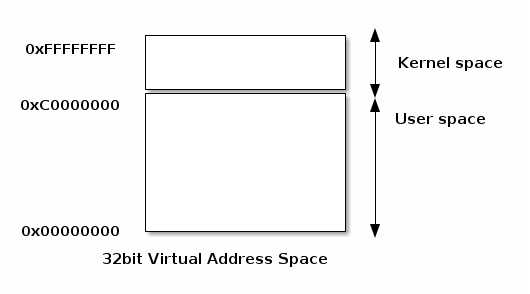
User space and kernel space may refer specifically to memory protection or to virtual address spaces associated with either the kernel or user applications.
Grossly simplifying, the kernel space is the memory area that is reserved to the kernel while user space is the memory area reserved to a particular user process. The kernel space is accessed protected so that user applications can not access it directly, while user space can be directly accessed from code running in kernel mode.
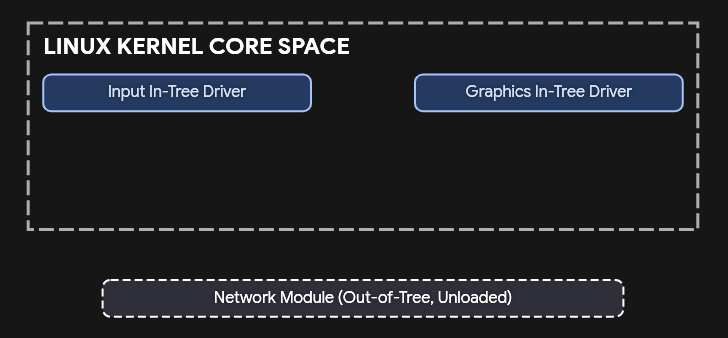
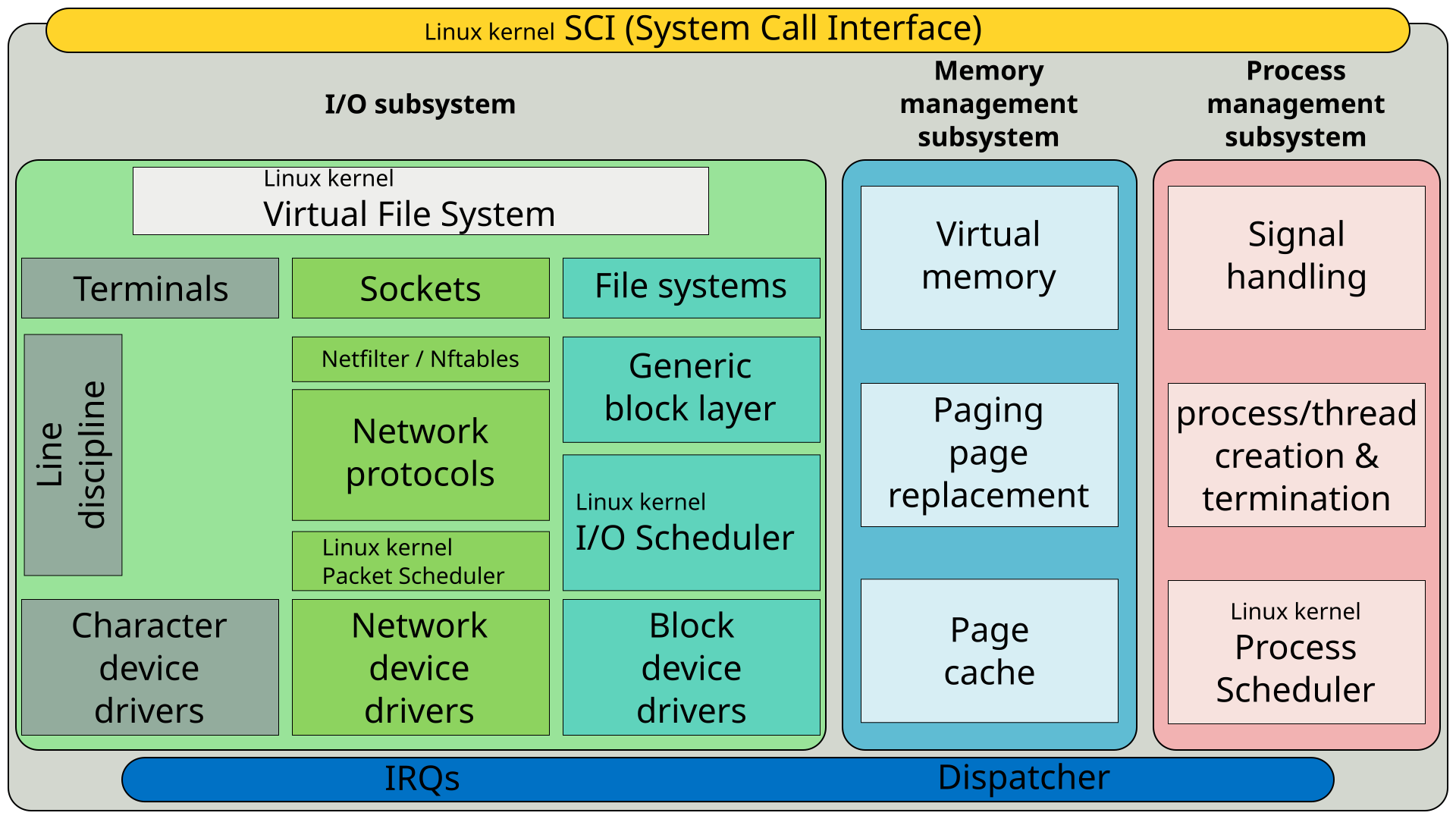
The kernel code itself can be logically separated in core kernel code and device drivers code. Device drivers code is responsible of accessing particular devices while the core kernel code is generic. The core kernel can be further divided into multiple logical subsystems (e.g. file access, networking, process management, etc.)
Types of kernels
There are four main types of kernels in OS:
- Monolithic Kernel: All OS services (process management, memory management, file system, device drivers) run in a single address space (often called kernel space).
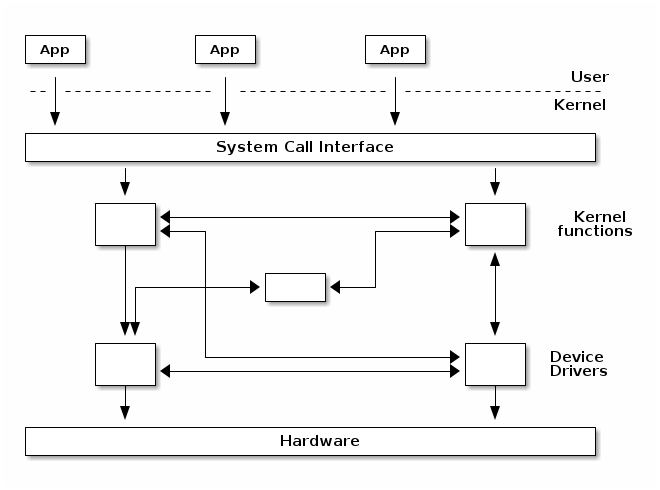
However, most monolithic kernels do enforce a logical separation between subsystems especially between the core kernel and device drivers with relatively strict APIs (but not necessarily fixed in stone) that must be used to access services offered by one subsystem or device drivers. This, of course, depends on the particular kernel implementation and the kernel's architecture.
Linux is a monolithic, modular kernel OS.
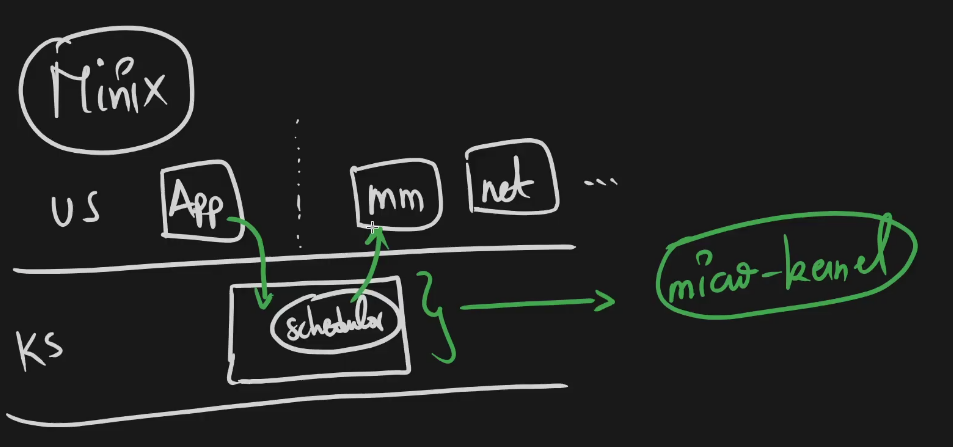
- Microkernel: Only essential services (IPC, basic memory management, scheduling) run in kernel space. Other services run as user-space processes.
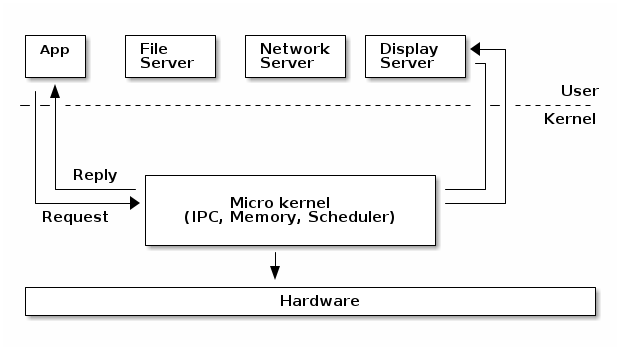
In a micro-kernel architecture the kernel contains just enough code that allows for message passing between different running processes. Practically that means implement the scheduler and an IPC mechanism in the kernel, as well as basic memory management to setup the protection between applications and services.
One of the advantages of this architecture is that the services are isolated and hence bugs in one service won't impact other services.
As such, if a service crashes we can just restart it without affecting the whole system. However, in practice this is difficult to achieve since restarting a service may affect all applications that depend on that service (e.g. if the file server crashes all applications with opened file descriptors would encounter errors when accessing them).
This architecture imposes a modular approach to the kernel and offers memory protection between services but at a cost of performance. What is a simple function call between two services on monolithic kernels now requires going through IPC and scheduling which will incur a performance penalty
- Hybrid Kernel: Combines aspects of both monolithic and microkernel architectures. Some non-essential services (like device drivers or file systems) can be dynamically loaded into the kernel space, but the core remains modular.
Linux is a monolithic kernel, not a hybrid kernel, although it incorporates modular elements that blur the distinction for some observers. The Linux kernel runs all its core services (such as device drivers, file systems, and network protocols) in kernel space within a single address space, which is the defining characteristic of a monolithic architecture.
- Exokernel: Provides minimal hardware abstractions, allowing user-space applications to directly manage hardware resources.
Micro-kernels vs monolithic kernels
Advocates of micro-kernels often suggest that micro-kernel are superior because of the modular design a micro-kernel enforces. However, monolithic kernels can also be modular and there are several approaches that modern monolithic kernels use toward this goal:
- Components can enabled or disabled at compile time
- Support of loadable kernel modules (at runtime)
- Organize the kernel in logical, independent subsystems
- Strict interfaces but with low performance overhead: macros, inline functions, function pointers
There is a class of operating systems that (used to) claim to be hybrid kernels, in between monolithic and micro-kernels (e.g. Windows, Mac OS X). However, since all of the typical monolithic services run in kernel-mode in these operating systems, there is little merit to qualify them other then monolithic kernels.
Many operating systems and kernel experts have dismissed the label as meaningless, and just marketing. Linus Torvalds said of this issue:
"As to the whole 'hybrid kernel' thing - it's just marketing. It's 'oh, those microkernels had good PR, how can we try to get good PR for our working kernel? Oh, I know, let's use a cool name and try to imply that it has all the PR advantages that that other system has'."
1. Process Scheduler (Process & Thread Management)
Linux uses CFS (Completely Fair Scheduler), a red-black tree ordered by vruntime (virtual runtime). Each scheduling unit accumulates vruntime; the leftmost node (lowest vruntime) runs next.
The algorithm kind boils down to a simple thing: (among the tasks on a given runqueue) the task with the lowest vruntime is the task that most deserves to run, hence select it as 'next'.
It quantifies the amount of CPU time a task has consumed, scaled inversely by its scheduling weight (priority).
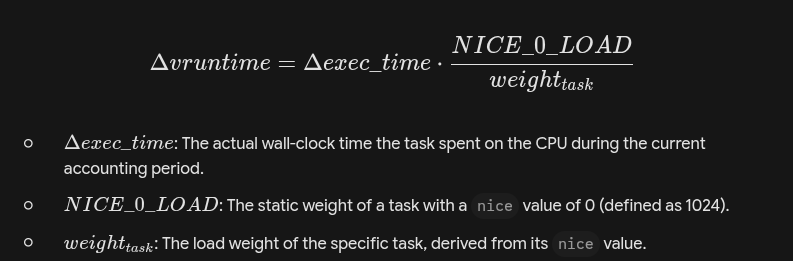
The nice value of a process can range from -20 (high priority) to +19 (low priority). By default, processes start with a nice value of 0. Increasing the nice value lowers the process priority, while decreasing it raises the priority.
The algo kind of boils down to a simple thing: (among the tasks on a given runqueue) the task with the lowest vruntime is the task that most deserves to run, hence select it as 'next'. (The actual implementation is done using an rbtree for efficiency).
The scheduler does differentiate between processes and threads they are trail the same and called task
E.i. Linux processes and threads are implemented particularly different than other kernels. There are no internal structures implementing processes or threads, instead there is a struct task_struct that describe an abstract scheduling unit called task.
Fundamentals/Threads
Fundamentals/Processes vs Threads
Fundamentals/Synchronisation
Processes in Linux are assigned priorities that influence how often the scheduler allows them to run. These priorities can be divided
into two types:
- Static Priority: Real-time tasks use static priorities (0 to 99). Higher priority tasks are given preference.
- Dynamic Priority: Non-real-time tasks have dynamic priorities, determined by a combination of their "nice" value and the system load.
The scheduler can force a context switch while a thread is executing in kernel mode. If a high-priority hardware interrupt (IRQ) wakes a blocked process, the kernel can immediately swap out the currently executing kernel-mode thread. The execution time of a given task is proportional to it priority
💡 A task has pointers to resources, such as address space, file descriptors, IPC ids, etc. The resource pointers for tasks that are part of the same process point to the same resources, while resources of tasks of different processes will point to different resources.
This peculiarity, together with the clone() and unshare() system call allows for implementing new features such as namespaces.
Namespaces are used together with control groups (cgroup) to implement operating system virtualisation in Linux.
cgroup is a mechanism to organise processes hierarchically and distribute system resources along the hierarchy in a controlled and configurable manner.
Linux real-time scheduler
Linux supports real-time scheduling. A real-time tasks are given priority over normal tasks. There are two main real-time policies:
- SCHED_FIFO (First In, First Out): Tasks with this policy run until they voluntarily yield the
CPU, block, or a higher-priority real-time task preempts them. No time slicing occurs here. - SCHED_RR (Round Robin): Similar to SCHED_FIFO but with time slicing. If a task's
time slice expires, it is moved to the end of the real-time queue.
Batch scheduling
Batch scheduling is used for processes that are not interactive and don't need immediate execution. It's typically used for background or batch jobs, where completion time isn't as critical.
Idle scheduling
Idle scheduling is designed for tasks that should run only when no other tasks are running.
These tasks are assigned the lowest possible priority.
2. Memory Management (MM)
Embedded Linux Basics#Address space
3. Virtual File System (VFS)
Embedded Linux Basics#Linux Filesystem Hierarchy
4. Device Drivers & I/O
(not completed)
5. Networking Stack
6. Inter-Process Communication (IPC)
(not completed)
Application binary interface (ABI)
An application binary interface (ABI) is an interface exposed by software that is defined for in-process machine code access. Often, the exposing software is a library, and the consumer is a program.
Calling convention
each architecture has it own way of calling interrupts, passing argument between function and retuning values
you can find these information in the instruction set architecture (ISA)
x86_64: The
intInstructionirq_handler_x86: push rax ; Hardware already pushed RIP, CS, RFLAGS, RSP, SS mov rax, 1 ; Do "work" (e.g., set a flag) pop rax iretq ; Atomic return: pops the hardware frame and resumes ; --- The Trigger --- trigger_interrupt: int 0x80 ; CPU traps here, transitions to ring 0, and jumpsARMv8-A: The
svcInstruction; --- The Handler (located at VBAR_EL1 + 0x400) --- sync_exception_entry: stp x0, x1, [sp, #-16]! ; Manual stack management (Pre-index) mov x0, #1 ; Do "work" ldp x0, x1, [sp], #16 ; Restore eret ; Restore PSTATE from SPSR and PC from ELR ; --- The Trigger --- trigger_svc: svc #0 ; CPU traps, updates SPSR/ELR, and jumps to VBAR offse
Fundamentals/System Calls vs Signals
Putting It All Together:
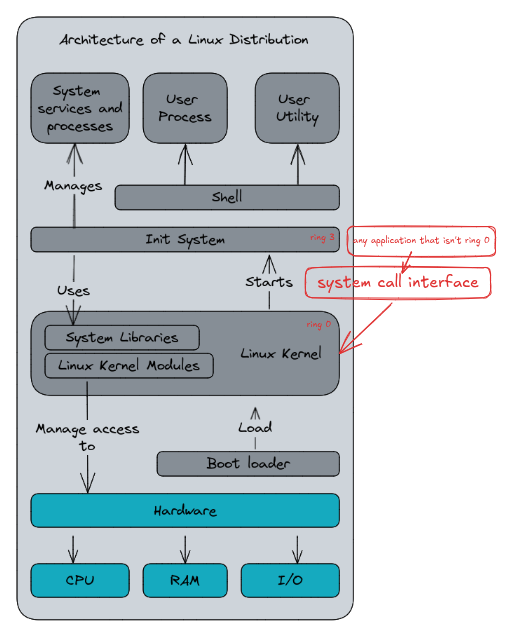
Here is a simplified diagram about the architecture of a Linux Distribution with the relation with the components
Linux Filesystem Hierarchy
https://en.wikipedia.org/wiki/Filesystem_Hierarchy_Standard
https://wiki.archlinux.org/title/File_systems
Virtual Filesystem (VFS)
The VFS defines the object model that all filesystems must implement to exist in the kernel.
The VFS is an abstraction layer that sits between the system call interface and concrete filesystem drivers. Its primary function is to multiplex standard POSIX file operations (like open(), read(), write(), stat()) across entirely different underlying filesystem implementations (ext4, NFS, FAT, procfs) without user-space needing to know the difference.
-
Object Model: The VFS defines a common object model that all filesystems must implement to be mounted in Linux. The primary abstractions are:
super_block: Represents a mounted filesystem instance.inode: Represents the metadata of a specific file or directory.dentry: Represents a directory entry, linking a name to aninodeand forming the directory cache (dcache) used for path resolution.file: Represents an open file descriptor, maintaining state like the file offset.
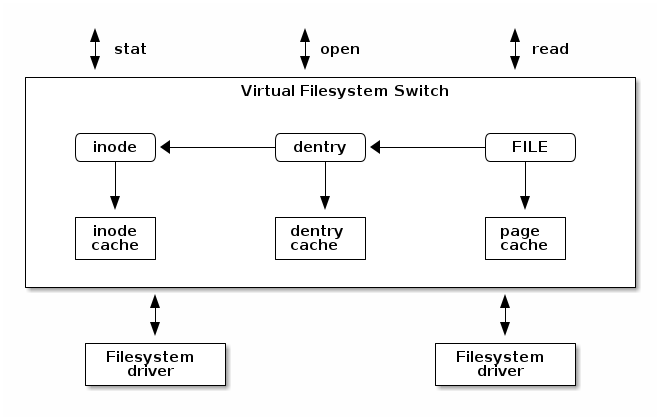
💡 The Linux VFS also implements a complex caching mechanism which includes the following:
- the inode cache - caches the file attributes and internal file metadata
- the dentry cache - caches the directory hierarchy of a filesystem
- the page cache - caches file data blocks in memory
A pseudo-filesystem (or synthetic filesystem) is a concrete filesystem implementation that registers itself with the VFS but is not backed by persistent storage on a block device. Instead, it serves as an interface to internal kernel data structures, state, or RAM.
Kernel Interface: They are the primary mechanism for realizing the Unix "everything is a file" philosophy for kernel internals. For example:
procfs(/proc): Interfaces with task/process structs (task_struct) and global kernel runtime parameters.sysfs(/sys): Directly exposes the kernel's unified device model. It is a 1:1 mapping of the internalkobjecthierarchy to user-space; creating akobjectin the kernel typically creates a directory insysfs.tmpfs/ramfs: Provide temporary, pure-RAM storage by backinginodesanddentriesdirectly with the page cache, bypassing the block layer entirely.cgroupfs: Exposes the control group interface for resource limiting and isolation.
Block I/O management
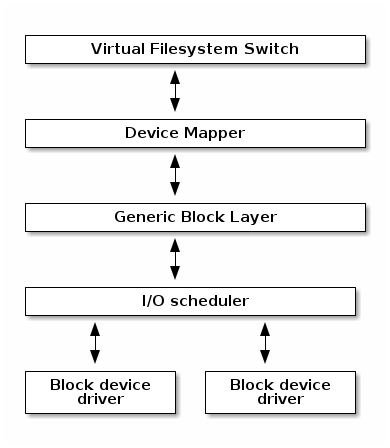
Block I/O is a method of data transfer where information is read from or written to storage devices in fixed-size chunks, known as blocks, rather than as a continuous stream of individual bytes.
creating block I/O requests, transforming block I/O requests (e.g. for software RAID or LVM), merging and sorting the requests and scheduling them via various I/O schedulers to the block device drivers.
Device Tree
In computing, a devicetree (also written device tree) is a data structure describing the hardware components of a particular computer so that the operating system's kernel can use and manage those components, including the CPU or CPUs, the memory, the buses and the integrated peripherals.
Base Permissions
Linux implements traditional UNIX Discretionary Access Control (DAC) via the i_mode field within the inode struct. Permissions are defined by a 9-bit matrix divided into three tiers: User (owner), Group, and Other. Each tier possesses three bits representing Read, Write, and Execute capabilities.
The VFS evaluates permissions using a strict short-circuit logic (e.g., in generic_permission()). The kernel checks if the process's effective UID matches the file's owner; if so, it applies the User bits and stops evaluating. If it fails, it checks the group credentials, and finally falls back to the Other bits. If a user owns a file with 000 permissions but is in a group with rwx permissions, access is denied because the kernel matches the User tier and immediately halts evaluation.
The Sticky Bit (S_ISVTX):
The sticky bit (octal 01000) alters VFS behavior depending on the inode type.
- On Directories (Restricted Deletion): When applied to a directory, it restricts the
unlink()andrename()system calls. To remove or rename a file within a sticky directory, the calling process must either own the file, own the directory, or possess theCAP_FOWNERcapability. This is the mechanism that allows/tmpto be world-writable (0777) without allowing users to delete each other's temporary files.- Example:
The /tmp directory is mounted with mode 1777 (drwxrwxrwt), granting global write access. User A (UID 1000) creates /tmp/data.txt. User B (UID 1001) issues an unlink("/tmp/data.txt") syscall. Despite User B having write permission on the /tmp directory (which normally governs file deletion), the VFS checks the sticky bit constraints. Since User B does not own data.txt or /tmp, and lacks CAP_FOWNER, the kernel blocks the deletion.
- Example:
- On Regular Files and Executables: In the modern Linux kernel, the sticky bit is completely ignored on regular files. Historically (in early UNIX implementations), setting the sticky bit on an executable instructed the OS to pin the program's text segment in swap space after termination to accelerate subsequent executions. Linux handles executable caching natively via the page cache, rendering the bit obsolete for files.
Effective User ID (EUID):
The EUID is the dynamic credential field within a process's struct cred that the kernel evaluates for I/O authorization and capability state transitions. It is architecturally decoupled from the Real UID (RUID), which tracks the permanent owner for resource limits and signal dispatching. The SetUID (S_ISUID, octal 04000) bit allows a process to initialize its EUID to the file owner's UID during an execve() system call.
Example:
The binary /usr/bin/passwd is owned by root with mode 4755 (-rwsr-xr-x).
- A user with RUID 1000 invokes
execve()on the binary. - The kernel detects
S_ISUID, initializing the new process with RUID 1000 and EUID 0. - The process invokes
open("/etc/shadow", O_RDWR). The VFS evaluates the EUID (0) against the file owner (0) and permits the operation.
compilation
Fundamentals/Preprocessing, compiling, assembling, and linking
Linux Library Types
- Static Libraries (
.a): Standardararchives containing unlinked object files (.o). - Shared Libraries (
.so): Executable and Linkable Format (ELF) shared objects designed for Position Independent Code (PIC).
Compilation and Linking Dynamics
Static linking resolves all symbol dependencies during the final link phase (ld). The linker extracts the necessary object code from the archive and physically copies it into the .text segment of the resulting executable. The output binary is self-contained and standalone.
Shared linking defers symbol resolution. The linker verifies symbol presence to build the executable, but rather than copying code, it writes the required library names into the executable's DT_NEEDED ELF dynamic section. It also embeds the path to the runtime dynamic linker (typically /lib64/ld-linux-x86-64.so.2) into the .interp section.
Memory and Execution Models
Shared libraries optimize system memory via page sharing. When multiple processes load the same .so, the OS maps the physical pages containing the read-only sections (.text and .rodata) into the virtual address spaces of all dependent processes. Writable sections (.data and .bss) utilize Copy-on-Write (COW) semantics; they share physical memory until a process modifies a page, at which point a private copy is instantiated for that process.
Shared libraries utilitze Copy-on-Write, so a library should have little amount of data that can be modified to be worth making it a shared library.
ELF (Executable and Linkable Format) is the file format used by Unix-like systems to store executables, object files, and shared libraries, containing the machine code, metadata, and section headers. DWARF is not an executable format but rather the standard debugging information format that stores source-level details like variable types, function names, and line numbers within ELF files.
1. RPATH / RUNPATH
These are hardcoded directory paths stored in the ELF binary's .dynamic section. The precedence depends on which specific dynamic tag the linker embedded during the build:
DT_RPATH: The legacy tag. If present (andDT_RUNPATHis absent), the loader evaluates these paths before checkingLD_LIBRARY_PATH.DT_RUNPATH: The modern tag (invoked via-enable-new-dtagsinld). If present, the loader evaluates these paths after checkingLD_LIBRARY_PATH.
2. LD_LIBRARY_PATH
An environment variable. The dynamic linker parses this at startup to override or supplement the default search paths, which is useful for testing or localized deployments.
3. System Cache (/etc/ld.so.cache)
A memory-mapped binary index generated and maintained by the ldconfig utility. Rather than executing expensive directory traversals across the paths defined in /etc/ld.so.conf, the loader queries this cache to immediately map a requested soname to its absolute file path.
4. System Default Directories (/lib, /usr/lib)
The ultimate fallback paths hardcoded into the dynamic linker itself. If the shared object remains unresolved after exhausting the explicit paths and the cache, the loader attempts a direct lookup here. The exact paths depend on the architecture and multilib configuration of the system; for example, an x86_64 ELF loader will target /lib64 and /usr/lib64 for 64-bit objects before looking at the generic /lib or /usr/lib directories.
Basic Makefile example:
CC = gcc

server: server.o libnetutils.so
gcc server.o -lnetutils -L$(shell pwd) -o server

server.o: server.c
gcc -c server.c

netutils.o: netutils.c
gcc -c netutils.c

libnetutils.so: netutils.o
gcc netutils.o -shared -fPIC -Wl,-soname=libnetutils.so.1 -o libnetutils.so.1.0
CC      = gcc
CFLAGS  =
LDFLAGS = -lnetutils -L$(shell pwd)
EXEC    = server
LIB     = libnetutils.so
SONAME  = $(LIB).1
SOLIB   = $(SONAME).0

$(EXEC): server.o $(LIB)
	$(CC) $< $(LDFLAGS) -o $@

%.o: %.c
	$(CC) -c $<

$(LIB): netutils.o
	$(CC) $< -shared -fPIC -Wl,-soname=$(SONAME) -o $(SOLIB)
	ln -s $(SOLIB) $(SONAME)
	ln -s $(SONAME) $@
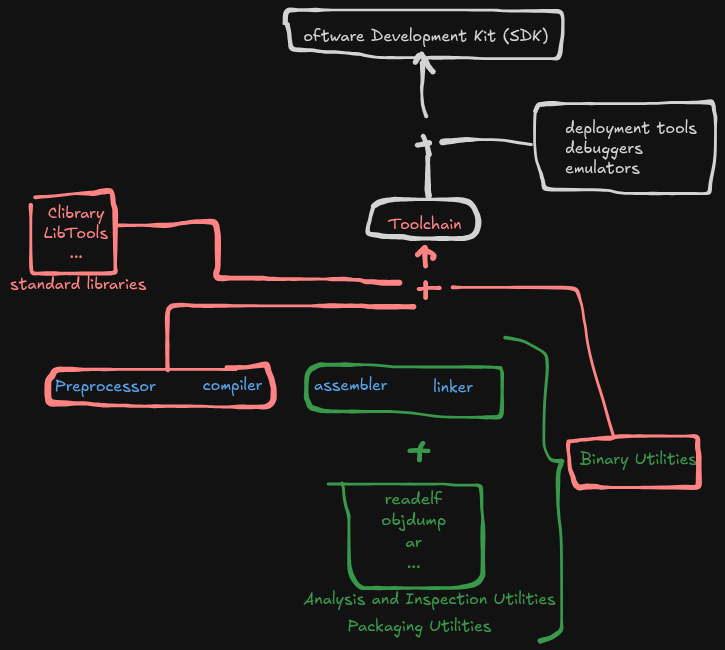
What are binutils? toolchain? SDK?
- Binutils (Binary Utilities) is a suite of programs used to assemble, link, analyze, and manipulate object files and executables. Components include the assembler (
as) and the linker (ld), alongside essential inspection tools likereadelf,objdump,nm, andstripfor examining memory segments, disassembling code, resolving symbol tables, and removing DWARF debugging data. - A toolchain is the sequential, tightly integrated pipeline of discrete programs required to translate source code into a target-specific binary executable. In a standard C/C++ environment, a toolchain encompasses the compiler frontend (like
gccorclangfor preprocessing, semantic analysis, and IR generation), the backend code generator, the binutils assembler and linker, and the target's standard libraries (such asglibc). Toolchains are fundamentally defined by their target architecture and Application Binary Interface (ABI), such as native toolchains or cross-compilation toolchains (e.g., anx86_64host building anarm-none-eabibinary). - An SDK (Software Development Kit) is a comprehensive, vendor-provided bundle that equips a toolchain with the specific context required to interface with a designated operating system, framework, or hardware environment. While a standard toolchain merely knows how to emit architecture-specific machine code, an SDK includes the target platform's specific APIs (headers and shared/static libraries), specialized build system wrappers, deployment tools, debuggers, and often emulators. Examples include the Android SDK, the iOS SDK within Xcode, or the NVIDIA CUDA Toolkit.
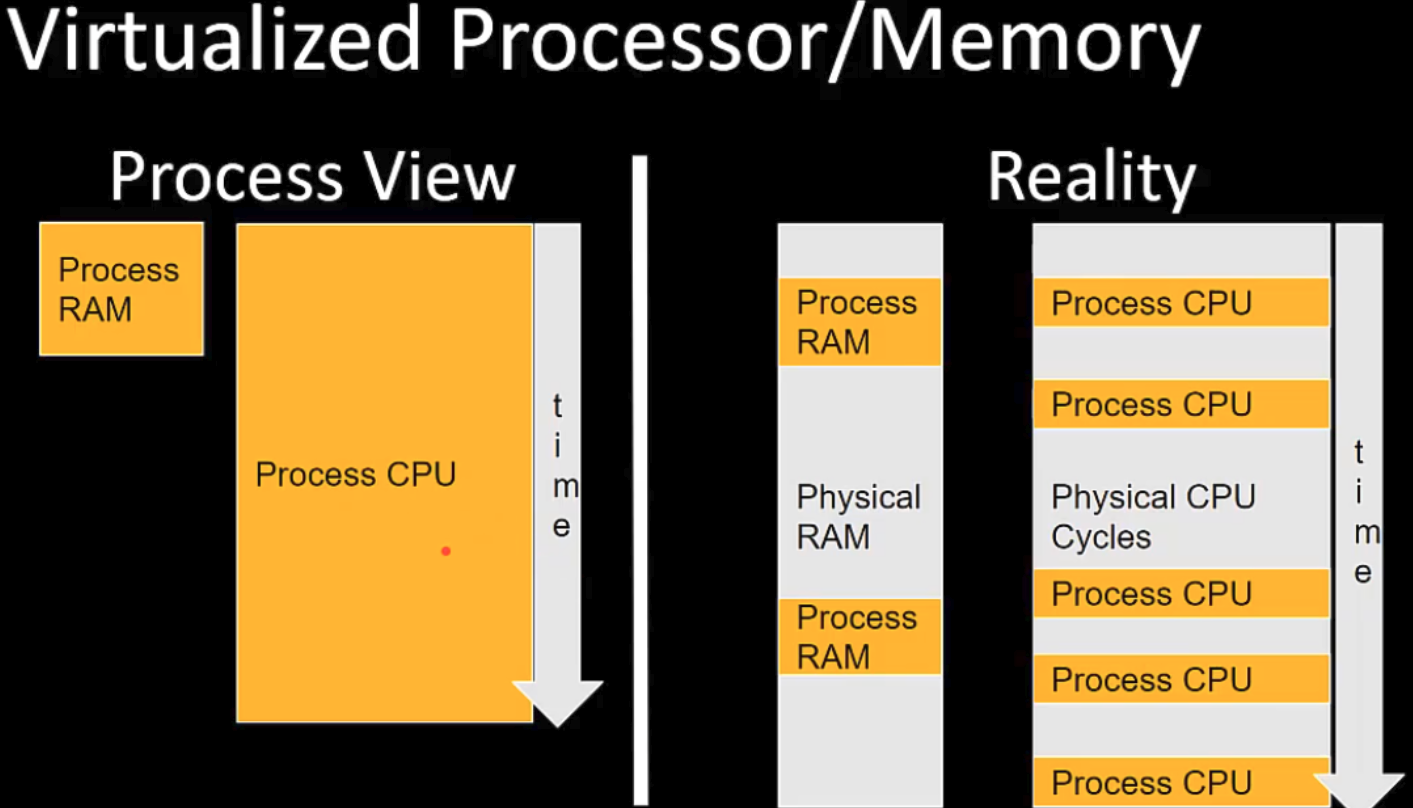
Address space
The address space term is an overload term that can have different meanings in different contexts.
Memory management unit (MMU)
computer hardware unit having all memory references passed through itself, primarily performing the translation of virtual memory addresses to physical addresses. And usually integrated directly into the CPU.
translation lookaside buffer (TLB)
memory cache that is used to reduce the time taken to access a user memory location; part of the chip’s memory-management unit
The TLB ****is a memory cache that stores the recent translations of virtual memory addresses to physical memory addresses.
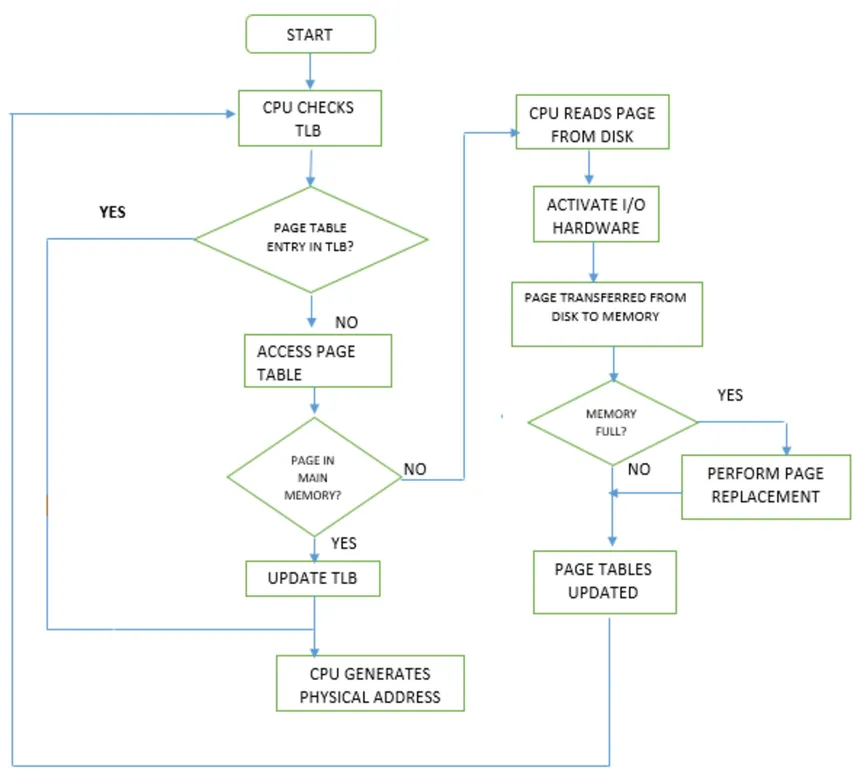
https://en.wikipedia.org/wiki/Translation_lookaside_buffer
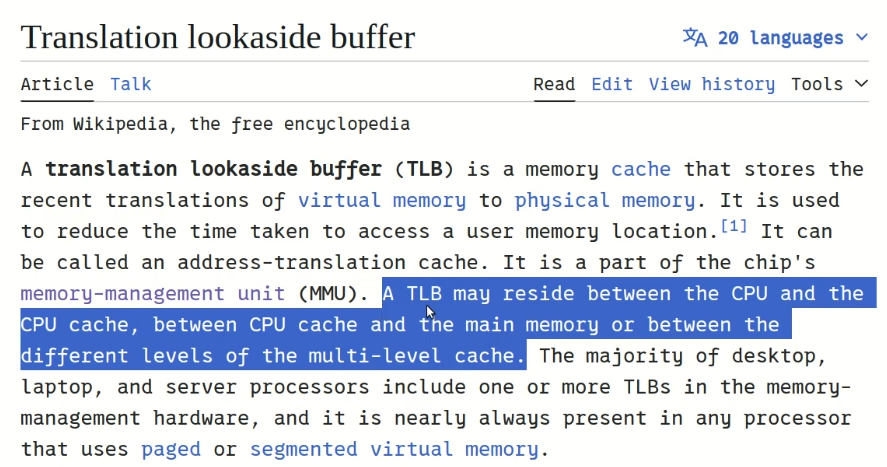
The translation process
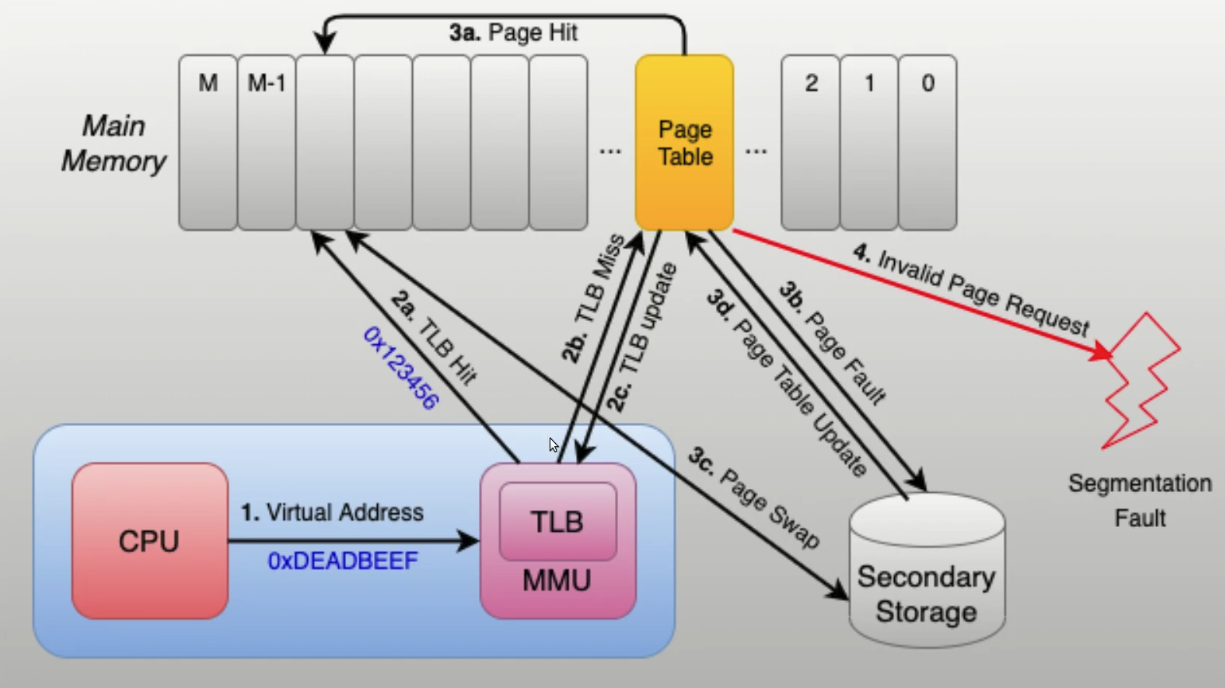
The memory management unit (MMU) inside the CPU stores a cache of recently used mappings from the operating system's page table. This is called the translation lookaside buffer (TLB), which is an associative cache.
When a virtual address needs to be translated into a physical address, the TLB is searched first. If a match is found, which is known as a TLB hit, the physical address is returned and memory access can continue. However, if there is no match, which is called a TLB miss, the MMU, the system firmware, or the operating system's TLB miss handler will typically look up the address mapping in the page table to see whether a mapping exists, which is called a page walk. If one exists, it is written back to the TLB, which must be done because the hardware accesses memory through the TLB in a virtual memory system, and the faulting instruction is restarted, which may happen in parallel as well. The subsequent translation will result in a TLB hit, and the memory access will continue.
💡 The lookup may fail if there is no translation available for the virtual address, meaning that virtual address is invalid. This will typically occur because of a programming error, and the operating system must take some action to deal with the problem. On modern operating systems, it will cause a segmentation fault signal (segfault) being sent to the offending program.
Page fault
a page fault is an exception that the memory management unit (MMU) raises when a process accesses a memory page without proper preparations. Accessing the page requires a mapping to be added to the process's virtual address space. Furthermore, the actual page contents may need to be loaded from a back-up, e.g. a disk. The MMU detects the page fault, but the operating system's kernel handles the exception by making the required page accessible in the physical memory or denying an illegal memory access.
https://en.wikipedia.org/wiki/Page_fault
💡 Valid page faults are common and necessary to increase the amount of memory available to programs in any operating system that uses virtual memory, such as Windows and macOS.
Page fault Types
Minor (Soft) Page Fault
Occurs when the target virtual page already resides in physical memory but lacks a valid mapping in the faulting process's page table. The OS resolves this entirely in software by updating the Memory Management Unit (MMU) without initiating disk I/O. This typically manifests during shared memory access or when reclaiming pages still resident in the OS page cache.
Major (Hard) Page Fault
Triggered when the target page is absent from physical memory, necessitating demand paging. The page fault handler must allocate a physical frame, which may require evicting and writing a modified page to a backing store if memory is contended. The OS then performs synchronous disk I/O to load the page and updates the MMU mapping. The associated mass storage access introduces significant execution latency.
Invalid Page Fault
Arises from a memory access violation where the referenced virtual address falls outside the process's allocated virtual address space. A common trigger is a null pointer dereference, as the zero page is deliberately unmapped by the MMU. The OS intercepts the invalid access and typically dispatches a segmentation fault to the offending process, precipitating abnormal termination.
Pageable kernel memory
A kernel supports pageable kernel memory if parts of kernel memory (code, data, stack or dynamically allocated memory) can be swapped to disk.
Kernel stack
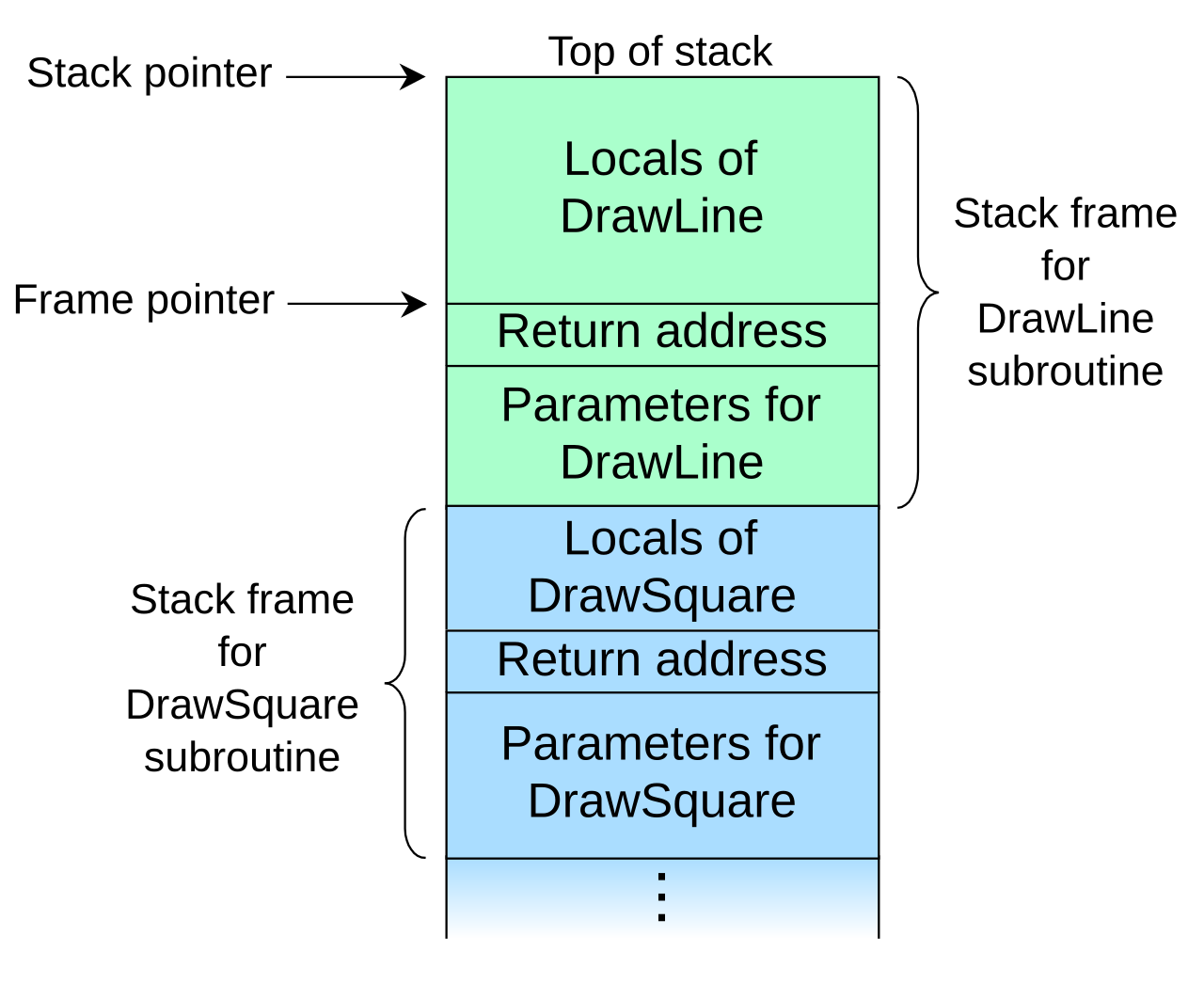
All process has a kernel stack that is used to maintain the function call chain and local variables state while it is executing in kernel mode, as a result of a system call.
The kernel stack is small (4KB - 12 KB) so the kernel developer has to avoid allocating large structures on stack or recursive calls that are not properly bounded.
A call stack is used for several related purposes, but the main reason for having one is to keep track of the point to which each active subroutine should return control when it finishes executing. An active subroutine is one that has been called, but is yet to complete execution, after which control should be handed back to the point of call. Such activations of subroutines may be nested to any level (recursive as a special case), hence the stack structure. For example, if a subroutine DrawSquare calls a subroutine DrawLine from four different places, DrawLine must know where to return when its execution completes. To accomplish this, the address following the instruction that jumps to DrawLine, the return address, is pushed onto the top of the call stack as part of each call.
Execution contexts / Operating modes
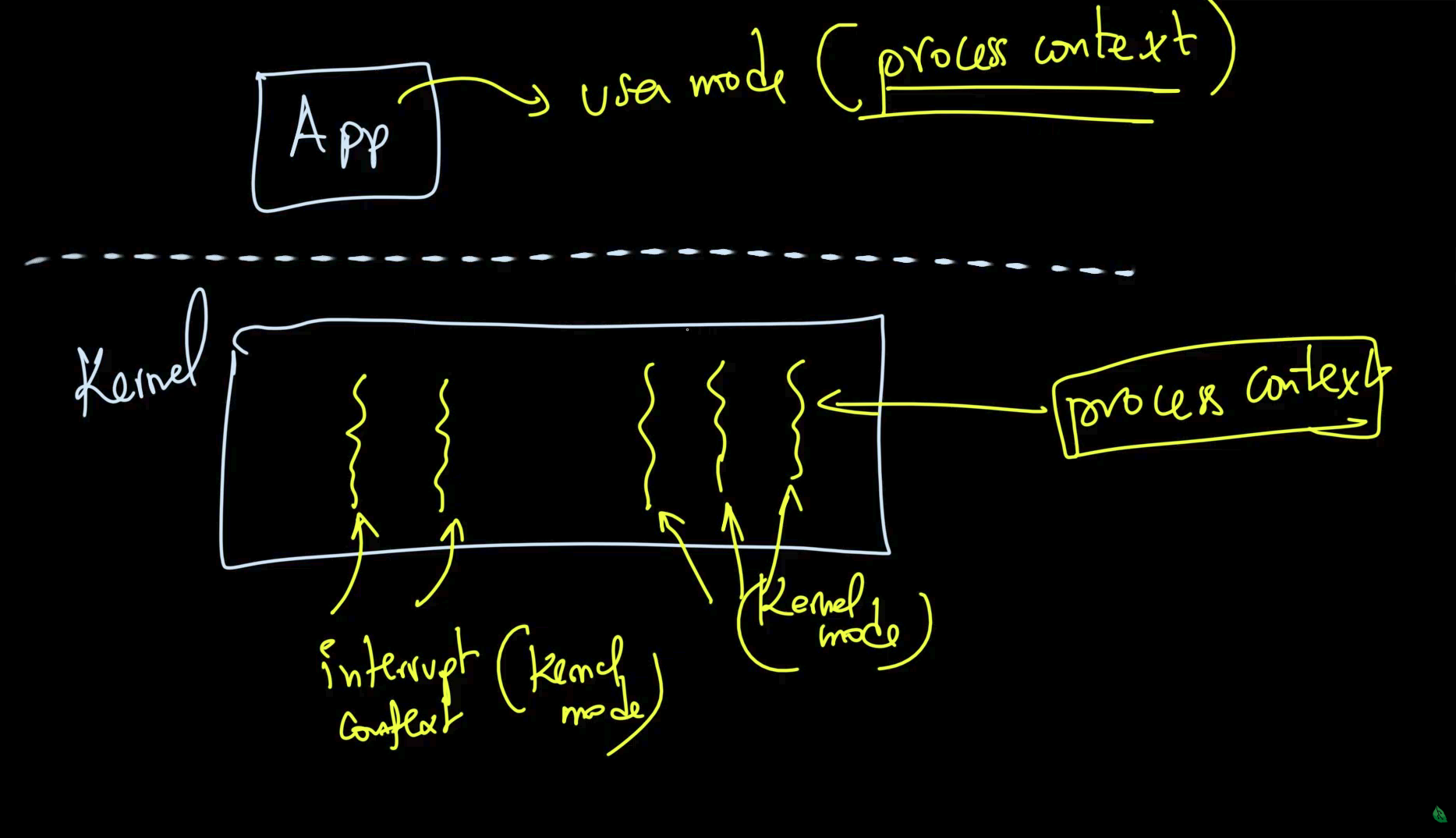
One of the most important jobs of the kernel is to service interrupts and to service them efficiently. This is so important that a special execution context is associated with it.
The kernel executes in interrupt context when it runs as a result of an interrupt. This includes the interrupt handler, but it is not limited to it, there are other special (software) constructs that run in interrupt mode.
Code running in interrupt context always runs in kernel mode and there are certain limitations that the kernel programmer has to be aware of (e.g. not calling blocking functions or accessing user space).
nterrupt context cannot access user-space memory due to address space volatility and the inability to handle page faults.
Address Space Volatility
Hard IRQs execute asynchronously, preempting arbitrary code. The active page directory (e.g.,CR3on x86) belongs to the interrupted task. Consequently, evaluating a user-space virtual address from an interrupt handler will resolve against the wrong process's page tables, leading to data corruption or segmentation faults.Page Faults and Scheduling Constraints
User-space memory is demand-paged. Accessing a swapped-out or unallocated page triggers a page fault, requiring synchronous disk I/O and putting the executing thread to sleep. Interrupt handlers lack a backing thread structure (liketask_structin Linux) and are not schedulable entities. Attempting to yield the CPU from hard IRQ context leaves the scheduler with no state to save, violating the concurrency model and triggering an immediate kernel panic (e.g., "scheduling while atomic").
“Opposed” to interrupt context there is process context. Code that runs in process context can do so in user mode (executing application code) or in kernel mode (executing a system call).
Operating modes (e.g. arm Cortex-M3)
The processor supports two modes of operation, Thread mode and Handler mode:
- The processor enters Thread mode on Reset, or as a result of an exception return. Privileged and Unprivileged code can run in Thread mode.
- The processor enters Handler mode as a result of an exception. All code is privileged in Handler mode.
https://developer.arm.com/documentation/ddi0344/k/programmers-model/operating-modes
https://developer.arm.com/documentation/ddi0210/c/Programmer-s-Model/Operating-modes
Execution Modes (Privilege Levels)
Execution modes dictate what the currently executing instruction stream is allowed to do. They are enforced by the hardware's memory management unit (MMU) and instruction decoder. In x86, these are implemented as four protection rings (Ring 0 to Ring 3).
- Kernel Mode (Ring 0 / Supervisor): Code running here has unrestricted access to the underlying hardware. It can execute privileged instructions (
hlt,cli,sti,invlpg), modify control registers (CR3to swap page tables), read/write MSRs, and access any physical or virtual memory address. The kernel scheduler, hardware interrupt handlers, and core device drivers operate in this mode.- User Mode (Ring 3 / User):
Code is restricted. It cannot execute privileged instructions. Memory access is strictly governed by the page tables; attempting to read or write a page marked with the Supervisor flag (the U/S bit cleared in the Page Table Entry) triggers a hardware exception (Page Fault). User-mode threads cannot directly interact with hardware peripherals.
Multi-tasking
Multitasking is the ability of the operating system to "simultaneously" execute multiple programs. It does so by quickly switching between running processes.
Cooperative multitasking requires the programs to cooperate to achieve multitasking. A program will run and relinquish CPU control back to the OS, which will then schedule another program.
With preemptive multitasking the kernel will enforce strict limits for each process, so that all processes have a fair chance of running. Each process is allowed to run a time slice (e.g. 100ms) after which, if it is still running, it is forcefully preempted and another task is scheduled.
Preemptive multitasking and preemptive kernels are different terms.
A kernel is preemptive if a process can be preempted while running in kernel mode.
However, note that non-preemptive kernels may support preemptive multitasking.
- Non-Preemptive Kernel: A thread executing kernel code (via syscall or exception) cannot be forcibly descheduled. It retains the CPU until it voluntarily yields.
- Preemptive Kernel: The scheduler can force a context switch while a thread is executing in kernel mode. If a high-priority hardware interrupt (IRQ) wakes a blocked process, the kernel can immediately swap out the currently executing kernel-mode thread. This is a prerequisite for Real-Time Operating Systems (RTOS).
- Selective Preemptive Kernel: An implementation-specific middle ground. Mainline Linux, as noted in the thread, is not fully preemptive by default. Preemption is explicitly disabled during critical sections (e.g., when holding spinlocks or executing interrupt handlers) but allowed elsewhere in kernel space. Linux behavior is heavily implementation-specific and dictated by kernel build configurations (specifically the differences between
CONFIG_PREEMPT_NONE,CONFIG_PREEMPT_VOLUNTARY, andCONFIG_PREEMPT_LLX).
💡 Preemption is the method used to ensure responsiveness; real-time is the property of meeting deadlines. Not all preemptive systems are real-time (e.g., general-purpose OSs use preemption for fairness), but real-time systems almost always require preemption to guarantee bounded interrupt response times.
Difference between cores and threads: https://www.reddit.com/r/explainlikeimfive/comments/16729pd/eli5_what_are_cores_and_threads_in_cpus/
“Cores are CPUs, the physical thing you have on your computer is just multiple(4 or 8) smaler CPUs together, so its a 4 or 8-core CPU. Each of these work the same and can do the same tasks and they all work in parallel.
Threads are the same idea of paralell computing but in software, a thread is one task that runs on a computer, but because a computer has multiple cores it can run multipe threads at the same time.
But threads are realy jut a software concept, even a single core CPU can have multiple threads running on it. But in this case each thread is paused for some milliseconds to process the next one, so its not realy parallel, just switching between both tasks super fast.”
“I'll add to this that some CPUs are designed to have two threads "ready" for a core at any time. That means that some of the components like the registers are doubled.
In practice, that means that if a thread stalls, there is another one just waiting to be sent to the core.
A thread stalling means that it the CPU needs data that isn't available in the registers and needs to pause execution until the data it needs is fetched. In the mean time, thanks to having double the registers, the thread that was waiting can be processed. Yes, that thread can also stall.
That's what it means when you see a CPU with specifications like 6 cores / 12 threads. Intel named their implementation Hyper-Threading.
In practice, this means that if you have workloads on the CPU where threads don't stall, having two "threads" per core won't give any performance benefit. In other use cases, it can speed things up.”
Asymmetric MultiProcessing (ASMP)
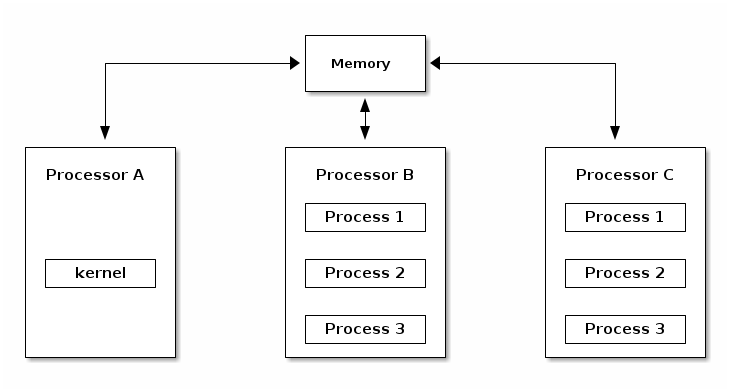
Asymmetric MultiProcessing (ASMP) is a way of supporting multiple processors (cores) by a kernel, where a processor is dedicated to the kernel and all other processors run user space programs.
The disadvantage of this approach is that the kernel throughput (e.g. system calls, interrupt handling, etc.) does not scale with the number of processors and hence typical processes frequently use system calls. The scalability of the approach is limited to very specific systems (e.g. scientific applications).
Symmetric MultiProcessing (SMP)
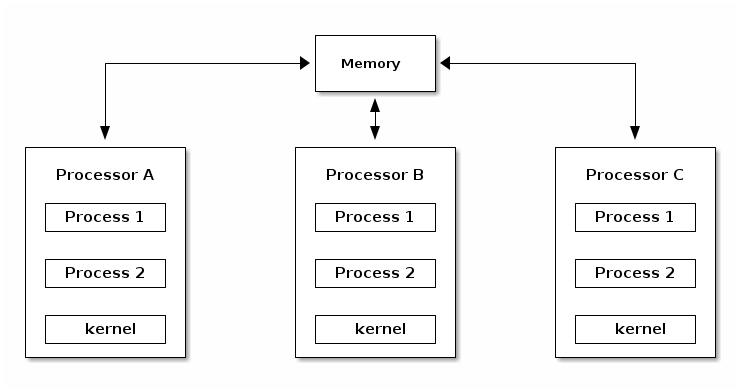
As opposed to ASMP, in SMP mode the kernel can run on any of the existing processors, just as user processes. This approach is more difficult to implement, because it creates race conditions in the kernel if two processes run kernel functions that access the same memory locations.
In order to support SMP the kernel must implement synchronization primitives (e.g. spin locks) to guarantee that only one processor is executing a critical section.
Linux source code layout
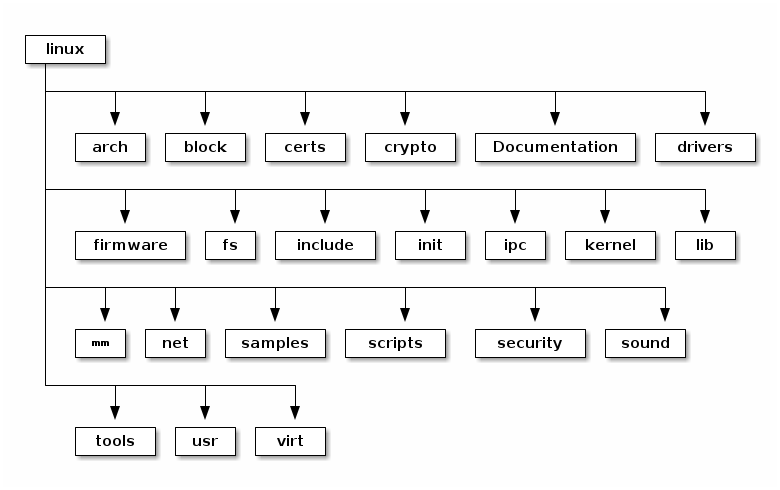
These are the top level of the Linux source code folders:
- arch - contains architecture specific code; each architecture is implemented in a specific sub-folder (e.g. arm, arm64, x86)
- block - contains the block subsystem code that deals with reading and writing data from block devices: creating block I/O requests, scheduling them (there are several I/O schedulers available), merging requests, and passing them down through the I/O stack to the block device drivers
- certs - implements support for signature checking using certificates
- crypto - software implementation of various cryptography algorithms as well as a framework that allows offloading such algorithms in hardware
- Documentation - documentation for various subsystems, Linux kernel command line options, description for sysfs files and format, device tree bindings (supported device tree nodes and format)
- drivers - driver for various devices as well as the Linux driver model implementation (an abstraction that describes drivers, devices buses and the way they are connected)
- firmware - binary or hex firmware files that are used by various device drivers
- fs - home of the Virtual Filesystem Switch (generic filesystem code) and of various filesystem drivers
- include - header files
- init - the generic (as opposed to architecture specific) initialization code that runs during boot
- ipc - implementation for various Inter Process Communication system calls such as message queue, semaphores, shared memory
- kernel - process management code (including support for kernel thread, workqueues), scheduler, tracing, time management, generic irq code, locking
- lib - various generic functions such as sorting, checksums, compression and decompression, bitmap manipulation, etc.
- mm - memory management code, for both physical and virtual memory, including the page, SL*B and CMA allocators, swapping, virtual memory mapping, process address space manipulation, etc.
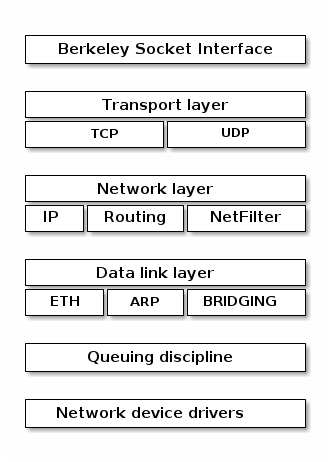
- net - implementation for various network stacks including IPv4 and IPv6; BSD socket implementation, routing, filtering, packet scheduling, bridging, etc.
- samples - various driver samples
- scripts - parts the build system, scripts used for building modules, kconfig the Linux kernel configurator, as well as various other scripts (e.g. checkpatch.pl that checks if a patch is conform with the Linux kernel coding style)
- security - home of the Linux Security Module framework that allows extending the default (Unix) security model as well as implementation for multiple such extensions such as SELinux, smack, apparmor, tomoyo, etc.
- sound - home of ALSA (Advanced Linux Sound System) as well as the old Linux sound framework (OSS)
- tools - various user space tools for testing or interacting with Linux kernel subsystems
- usr - support for embedding an initrd file in the kernel image
- virt - home of the KVM (Kernel Virtual Machine) hypervisor
Device Tree Blob
Prior to the widespread adoption of the Device Tree,
what is Device tree why it was created and how it is implemented. every new board variant required kernel source modifications and a unique kernel binary.
The Device Tree (adopted from Open Firmware/PowerPC) was introduced to completely decouple static hardware descriptions from the kernel binary (e.i. hard coding the relationship between the kernel and hardware). By abstracting the hardware topology into a separate configuration file, a single unified kernel image can boot across entirely different boards with same CPU architecture.
A Device Tree is a tree data structure (an acyclic graph) that describes the physical hardware topology of a system. While buses like PCIe and USB implement hardware-level enumeration protocols to dynamically report device IDs and capabilities, memory-mapped IP blocks (UARTs, I2C controllers, GPIO banks) on an SoC cannot be probed safely without prior knowledge of their memory locations. These blocks are called Memory-Mapped I/O (MMIO).
The Device Tree provides the kernel with the .
- compatible: A list of strings used by the kernel's driver core to match the device_node to a platform_driver. It acts as the driver selection mechanism.
- reg: Defines the physical memory address base and length for the device's MMIO registers.
- interrupts: Specifies the hardware IRQ lines.
- clocks / phys / regulators: Utilize "phandles" (unique 32-bit integer pointers) to link a consumer node to a provider node. For example, a UART node will use a phandle to reference the clock controller node that supplies its baud rate clock, ensuring the kernel enables the clock before the driver accesses the UART registers.
Hardware is authored in human-readable Device Tree Source (.dts) files. The kernel tree utilizes a heavily hierarchical structure using .dtsi (include) files. A common pattern is:
soc.dtsi: Defines the base CPU cores, interrupt controllers, and MMIO peripherals common to the silicon die.board.dts: Includessoc.dtsiand defines board-level specifics (e.g., enabling an I2C bus, defining specific GPIO pinmuxing, or adding an external PHY).
The Device Tree Compiler (dtc) parses the .dts files and compiles them into a binary format known as the Device Tree Blob (.dtb). The DTB (also referred to as the Flattened Device Tree, or FDT) is a highly compact, contiguous memory block consisting of a header, a memory reservation block, a structure block (the nodes and properties), and a strings block.
Linux Boot Sequence on an embedded device
Boot sequence for x86 device How Computers BOOT From Power Button to Operating
- The Boot ROM executes in-place (XIP) from masked on-chip ROM at the Reset Vector upon power-on. It samples hardware to determine the peripheral polling sequence (e.g., eMMC, SDIO, SPI NOR) to locate the First Stage Bootloader (FSBL/SPL). Because the external DRAM controller is uninitialized, the Boot ROM copies the FSBL into internal SRAM and transfers execution to it.
- The FSBL/SPL executes from internal SRAM. It responsible for configuration of memory. Once external DRAM is accessible, the SPL reads the Second Stage Boot Loader (SSBL, e.g., U-Boot proper) from the boot media, copies it into the RAM, and jumps execution to the SSBL entry point in DRAM.
- The SSBL locate the kernel image and device tree on non-volatile storage.
- & 5. The SSBL copies the compressed kernel image and the Device Tree (
.dtb) into RAM. The SSBL prepares the CPU state for kernel handoff (disabling interrupts, flushing/invalidating caches, setting CPU execution modes) and transfers execution to the kernel entry point. - The kernel decompresses itself, sets up page tables, and enables the MMU. It parses the Device Tree to discover and initialize hardware topology.
- The kernel extracts and mounts a temporary RAM disk. Once the drivers are loaded, it mounts the physical Rootfs to transition to the permanent filesystem.
- The kernel executes the first user-space program, establishing PID 1, by searching predefined paths (
/sbin/init,/etc/init,/bin/init,/bin/sh) or following theinit=parameter.